
Doc2X API v2 PDF reference
Basics
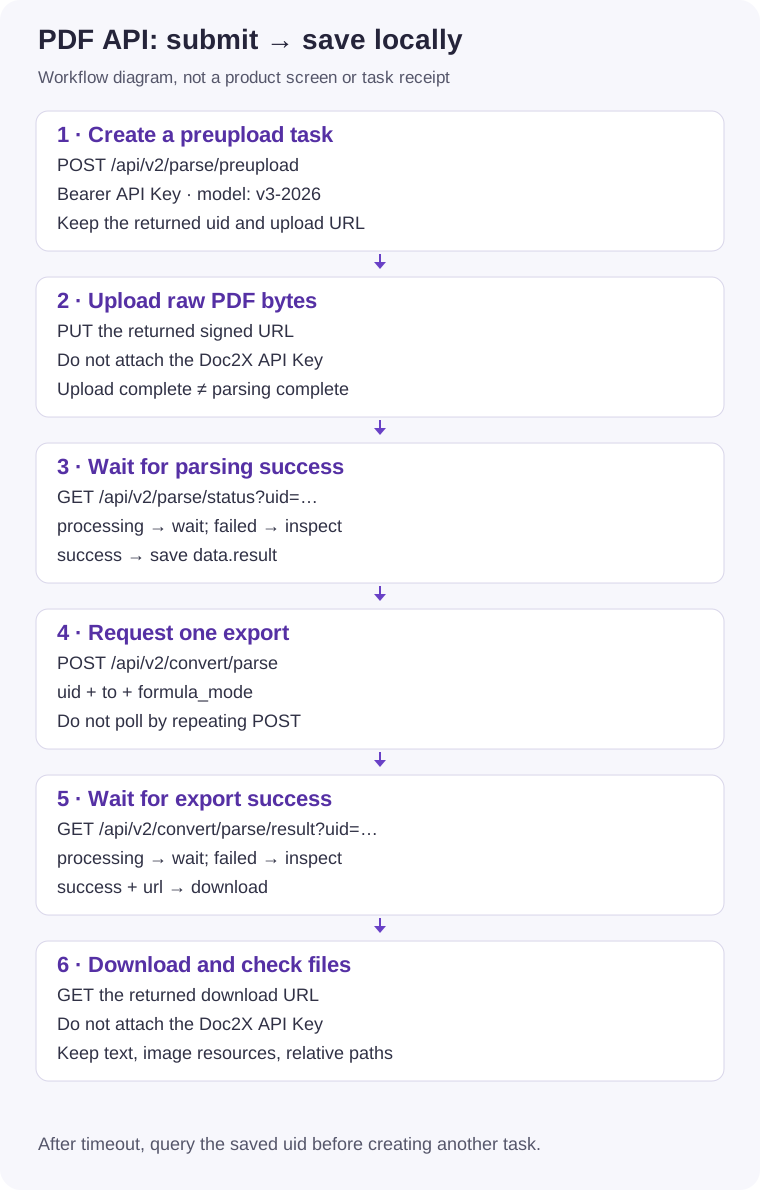
Base URL: https://v2.doc2x.noedgeai.com. This guide covers the Open Platform pipeline: create a preupload task, upload the PDF, wait for parsing, request export, and save the download. Website, CLI, and API credentials and format menus are different.
New integrations should use preupload instead of the legacy POST /api/v2/parse/pdf. v3-2026 is a parsing model selection; do not change the endpoint prefix to /api/v3.
Input and quota
- The published preupload file limit is 1 GiB (1,073,741,824 bytes) per PDF. The legacy direct-upload limit of 300 MiB is a different route. Account conditions, deployment configuration, or input constraints may impose additional limits.
- Per-task pages, concurrent tasks, pages being processed, and remaining quota are separate checks. Follow your Open Platform account limits and status responses; the historical 2000-page value is not a guarantee for every account. Image API and CLI limits are separate.
- Supply a valid, readable PDF. Renaming a different format to
.pdfdoes not convert it. Check encryption and compatibility locally; split or save a new copy when appropriate. - API results and associated images are temporary, approximately 24 hours. Download promptly. Saving result JSON or Markdown text alone does not save referenced images.
Authorization
Sign in to the Open Platform to create/manage an API Key and check parsing quota. This is not a desktop/Zotero login token. YOUR_DOC2X_API_KEY, TASK_UID, UPLOAD_URL, and DOWNLOAD_URL below are placeholders: replace them locally and keep credentials out of version control.
Authorization: Bearer YOUR_DOC2X_API_KEYSend Bearer authentication to API endpoints. Do not attach it to signed object-storage upload/download URLs. Signed URLs themselves grant temporary access; do not publish them in logs.
POST /api/v2/parse/preupload
The optional model accepts v2 or v3-2026; omission uses the documented default model. This tutorial explicitly requests v3-2026 rather than relying on defaults. Do not invent other values.
curl --fail-with-body --request POST 'https://v2.doc2x.noedgeai.com/api/v2/parse/preupload' \
  --header "Authorization: Bearer $DOC2X_API_KEY" \
  --header 'Content-Type: application/json' \
  --data '{"model":"v3-2026"}'
Simplified response illustration (placeholder ID and URL, not callable values):
{"code":"success","data":{"uid":"TASK_UID","url":"https://upload.example.invalid/signed.pdf"}}Save uid, then PUT the raw file bytes to data.url, not multipart/form-data. Upload promptly; use the actual signed URL expiration. Editing URL parameters cannot renew an expired signature.
curl --fail-with-body --request PUT "$UPLOAD_URL" --data-binary '@paper.pdf'After a successful PUT, query status instead of uploading again to the same URL. Preserve uid after a transport failure: a disconnected client does not prove the service received nothing. Blindly creating another task can consume quota twice.
GET /api/v2/parse/status
curl --fail-with-body --get 'https://v2.doc2x.noedgeai.com/api/v2/parse/status' \
  --header "Authorization: Bearer $DOC2X_API_KEY" \
  --data-urlencode "uid=$TASK_UID"
Poll every 1–3 seconds with a total deadline. Upload/queue state can take a short time to propagate. HTTP success is not task success: inspect both code and data.status.
| Field/state | Action |
|---|---|
code != "success" | API error; retain the error code and task ID. |
data.status = "processing" | Wait and GET again; do not repeat task creation. |
data.status = "failed" | Stop and inspect data.detail. |
data.status = "success" | Save data.result.pages, then request export. |
| Deadline or unfamiliar state | Retain uid and query the original task later. A local timeout does not cancel remote processing. |
Simplified success example:
{"code":"success","data":{"status":"success","progress":100,"result":{"pages":[{"page_idx":0,"page_width":1000,"page_height":1400,"md":"# Example\nText","url":"","score":89}]}}}A task can fail inside a successful HTTP/API envelope:
{"code":"success","data":{"status":"failed","detail":"Example failure detail"}}page_idx is zero-based; page_width/page_height define the result page coordinates. md is page Markdown, url may be empty, and score is a quality score, not character-level accuracy. See v3 JSON for structured fields.
POST /api/v2/convert/parse
After parsing succeeds, create one export task and poll the result endpoint. Do not use the creation endpoint as a polling endpoint.
| Parameter | Type | Meaning |
|---|---|---|
uid | string | Successfully parsed task ID. |
to | string | md, tex, or docx. Other website formats are not automatically public API values. |
formula_mode | string | Required: normally normal; use dollar for dollar-delimited Markdown formulas. |
filename | optional string | MD/TEX basename without extension, for example paper. |
merge_cross_page_forms | optional boolean | Attempt to merge tables across pages; review the result. |
formula_level | optional integer | 0: preserve formulas; 1: downgrade inline formulas to text; 2: downgrade all formulas. Effective only when the source parse used v3-2026. |
{"uid":"TASK_UID","to":"md","formula_mode":"normal","filename":"paper","merge_cross_page_forms":false,"formula_level":0}Replace the ID and save this as export-request.json:
curl --fail-with-body --request POST 'https://v2.doc2x.noedgeai.com/api/v2/convert/parse' \
  --header "Authorization: Bearer $DOC2X_API_KEY" \
  --header 'Content-Type: application/json' \
  --data-binary '@export-request.json'
A response can be {"code":"success","data":{"status":"processing","url":""}}. When comparing formats or formula levels for one uid, finish and download each export before requesting the next; do not overwrite results concurrently.
GET /api/v2/convert/parse/result
curl --fail-with-body --get 'https://v2.doc2x.noedgeai.com/api/v2/convert/parse/result' \
  --header "Authorization: Bearer $DOC2X_API_KEY" \
  --data-urlencode "uid=$TASK_UID"
Use bounded polling again. Download only when data.status="success" and data.url is nonempty. Inspect detail on failure. Parsing success and export success are separate stages.
{"code":"success","data":{"status":"success","url":"https://download.example.invalid/export.zip"}}Download and local storage
curl --fail --location --output export.zip "$DOWNLOAD_URL"
unzip -l export.zip
MD/TEX output can be a ZIP containing text and images. Check the actual format, then extract into a new directory. DOCX is an office document: although it also uses a ZIP container internally, keep its .docx extension and open it in an office application. Do not infer the format by renaming a file. Preserve relative resource paths and inspect formulas, images, tables, and page order.
A standard JSON parser converts \u0026 to &. Replace it once only if the parsed string still contains literal \u0026; do not otherwise rewrite a signed URL.
Complete Python example
Requires Python 3.10+ and requests (python -m pip install requests). Set DOC2X_API_KEY locally, prepare paper.pdf, save as parse_pdf.py, and run python parse_pdf.py. Running it submits real parsing/export tasks and consumes the applicable quota. This documentation example was validated offline, not run against the service for you.
import json
import os
import time
from pathlib import Path

import requests

BASE = "https://v2.doc2x.noedgeai.com"


def api(method, path, *, key, **kwargs):
    response = requests.request(method, BASE + path,
        headers={"Authorization": "Bearer " + key}, timeout=(10, 90), **kwargs)
    response.raise_for_status()
    body = response.json()
    if body.get("code") != "success":
        raise RuntimeError(f"API error: {body.get('code')}: {body.get('msg', '')}")
    return body["data"]


def wait_for(path, uid, *, key, max_wait=1200):
    deadline = time.monotonic() + max_wait
    while time.monotonic() < deadline:
        data = api("GET", path, key=key, params={"uid": uid})
        state = data.get("status")
        if state == "success":
            return data
        if state == "failed":
            raise RuntimeError(f"Task failed: {data.get('detail', '')}")
        # Upload/queue propagation can briefly precede processing.
        time.sleep(3)
    raise TimeoutError(f"Wait expired; retain uid={uid} and query status, do not resubmit")


def main():
    key = os.environ["DOC2X_API_KEY"]
    source = Path("paper.pdf")
    if not source.is_file() or source.stat().st_size == 0:
        raise ValueError("Provide a nonempty paper.pdf")
    out = Path("api-output")
    out.mkdir(exist_ok=False)  # Choose a new directory for each intentional task.
    task = api("POST", "/api/v2/parse/preupload", key=key,
               json={"model": "v3-2026"})
    uid = task["uid"]
    (out / "task.json").write_text(json.dumps({"uid": uid}), encoding="utf-8")
    # Signed object-storage URLs do not need your Doc2X Authorization header.
    with source.open("rb") as stream:
        response = requests.put(task["url"], data=stream, timeout=(10, 180))
        response.raise_for_status()
    parsed = wait_for("/api/v2/parse/status", uid, key=key)
    result = parsed["result"]
    (out / "result.json").write_text(
        json.dumps(result, ensure_ascii=False, indent=2), encoding="utf-8")
    pages = sorted(result.get("pages", []), key=lambda p: p.get("page_idx", 0))
    (out / "preview.md").write_text(
        "\n\n".join(p.get("md", "") for p in pages), encoding="utf-8")
    api("POST", "/api/v2/convert/parse", key=key, json={
        "uid": uid, "to": "md", "formula_mode": "normal",
        "filename": "paper", "merge_cross_page_forms": False, "formula_level": 0})
    exported = wait_for("/api/v2/convert/parse/result", uid, key=key)
    download_url = exported["url"].replace("\\u0026", "&")
    with requests.get(download_url, stream=True, timeout=(10, 180)) as response:
        response.raise_for_status()
        with (out / "export.zip").open("wb") as target:
            for chunk in response.iter_content(1024 * 1024):
                target.write(chunk)
    print(f"Saved result.json, preview.md and export.zip in {out}; uid={uid}")


if __name__ == "__main__":
    main()
api-output/task.json preserves uid before upload. result.json contains data.result for structured processing; preview.md combines page text but does not localize image URLs. export.zip is the Markdown export package. Choose a new output directory before an intentional new run.
Troubleshooting
| Error/symptom | Action |
|---|---|
| HTTP 401/403 | Check API Key, account, and permissions. A website login token is not an API Key. |
HTTP 429 / parse_task_limit_exceeded / parse_concurrency_limit | Reduce parallel work and wait for existing tasks; respect account task/page concurrency limits. |
parse_quota_limit | Check available Open Platform quota; do not retry repeatedly. |
parse_file_too_large / parse_page_limit_exceeded | Split according to the route and actual reported limits; website/CLI limits are not the API contract. |
parse_status_not_found | Check saved uid, account, and retention. Look for local backups if expired. |
parse_file_not_pdf / parse_file_invalid | Check PDF contents/encryption locally; changing the suffix is insufficient. |
parse_timeout / parse_error / parse_create_task_error | Retain task ID, code, and redacted request_id. Inspect/split the input or contact support; avoid endless task creation. |
parse_file_lock | Repeated failures may temporarily lock a file. Check compatibility/contact support instead of resubmitting under new names. |
| Broken/error download | Check HTTP and export status; do not save an error JSON as a ZIP. Query the original task before repeating OCR. |
Errors may use HTTP status or a business code inside HTTP 200. Concurrency, page, and quota errors can also appear after upload during status queries.
Integrations
- Official pdfdeal documentation: follow its current installation/version instructions; old packages may lack v3 crop helpers.
- MCP tools: Open Platform API Key, submission, polling, and file storage.
- CLI: personal-account login; a separate contract from the Open Platform API.
- Coze plugin: availability and arguments follow the plugin's current documentation.