
Doc2X API overview and entry points
Choose the right interface
| Goal | Guide | Authentication and result |
|---|---|---|
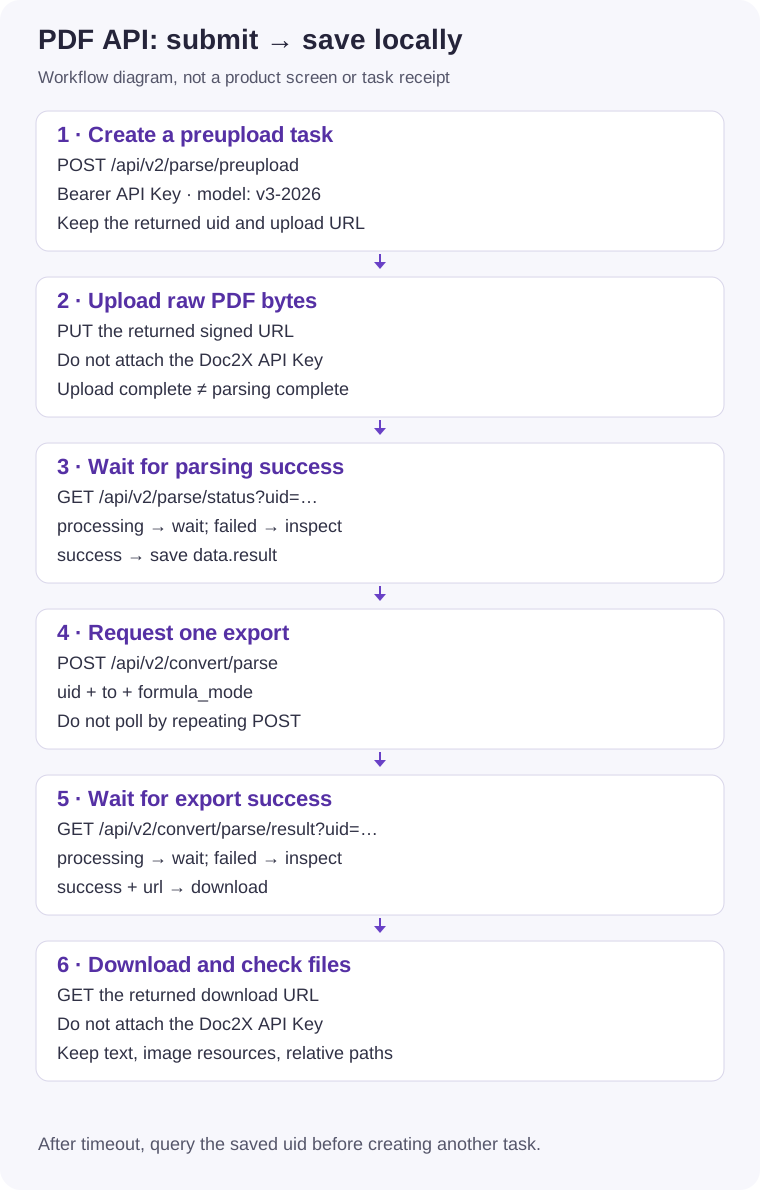
| Parse PDFs in your application | PDF API | Open Platform API Key; preupload→status→export→download. |
| Recognize JPG/PNG document images | Image API | Choose synchronous or async; save Markdown and image resources. |
| Read blocks, reading order, coordinates | v3 JSON | Explicit v3-2026 PDF parsing; save data.result. |
| Call these APIs from an MCP agent | MCP | Key injected into the local server; retain uid and output paths. |
| Personal-account parsing, translation, batches | CLI | CLI OAuth/desktop login; an API Key is not a login token. |
| Give an agent CLI workflow instructions | CLI Skills | Separate Skill/CLI installs; login, quota, and authorization still apply. |
Public parsing API export values are md/tex/docx. Website Excel, preserved-layout Word, image translation, and other menus do not imply matching public APIs. For document translation see the separate CLI/website guides; no translation endpoint is invented here. The desktop Zotero plugin also does not consume Open Platform API resources.
Minimal integration steps
- Sign in to the Open Platform, create/manage an API Key, and check quota/account limits.
- Start with one small PDF you are authorized to process, following the complete PDF example. Use an environment variable for the key; example placeholders are not working credentials.
- Save
uidand distinguish upload, parsing, export, and download stages. Poll GET status instead of repeatedly POSTing new tasks. - Download text and associated images, inspect them in the target editor, then decide whether to expand the batch.
Important boundaries
- API results and images are temporary, approximately 24 hours. Save promptly; Markdown alone does not include all referenced images.
- API, CLI, and website size/format limits are separate. Follow actual quota/concurrency/page-limit responses rather than assuming one allowance for every account.
- A timeout or disconnection does not prove no task was created. Keep uid and query it before consuming quota again.
- Do not publish API Keys or signed URLs. Support reports should include a redacted task/request ID, time, error code, and stage, not private documents or credentials.