
Batch Transfer of Existing Results
Batch transfer sends completed parsing or comparison-translation text results to Notion / FlowUs. It does not reparse the selected files and is different from batch parsing and translation of a local folder.
Before starting
- Use the signed-in Doc2X desktop app.
- Connect the destination Notion or FlowUs account in 账户管理 → 转存设置 (Account management → Online Save Settings).
- Confirm the source results are complete and readable. Fixed-layout PDFs are filtered from this text-transfer entry; use the dialog's actual transferable list.
Transfer step by step
- Open 多选操作文件 (Multi-select operations) from temporary storage, or visit all records.
- Switch to 多选文件 (Select files), expand the projects and select the actual parsing or translation results.
- Click 批量转存 (Batch transfer). This is the file-selection action, not folder selection for deletion.
- Choose FlowUs or Notion. WebDAV/NotebookLM belong to the project menu, as explained in the overview.
- Where 导出内容 (Export content) appears for translations, choose original, translation-only or bilingual content.
- Read 文件过滤提示 (File filtering notice) and check the transferable count. If it is lower than your selection, identify filtered fixed-layout PDFs or other unsuitable results.
- Check configuration, list and count, then click Batch transfer and keep the app open.
- Review success, skipped and failed items separately. In the destination service, locate and inspect the pages for each file.
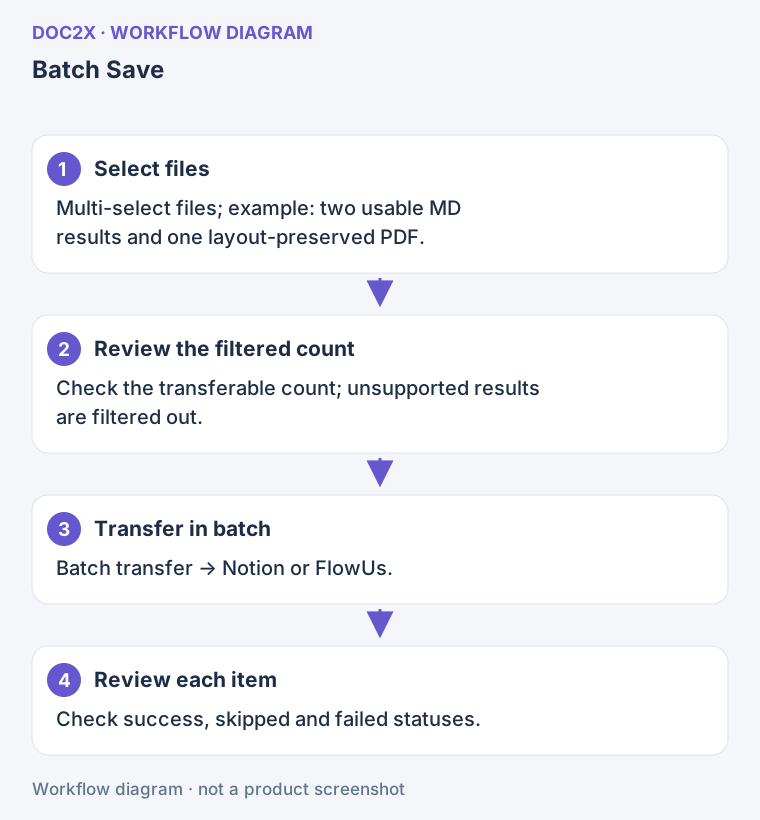
Diagram: Check the transferable count before starting, then review success, skipped and failed items individually.
Where results appear
Results appear as pages in the external service. The Doc2X cloud sources remain parsing or translation records. Check the end of each page, language scope, tables and images rather than relying on a newly created title alone.
Transferring multiple files is not continuous folder sync. Later translations or edits require another deliberate selection of source and destination.
Recover from partial failure
- Inspect the destination first: identify existing pages and incomplete content.
- Read the cause: fix authorization in settings, missing content at the source, or network access before retrying.
- Handle only necessary items: do not immediately recreate successful or existing pages as a whole batch. Reselect failed results as appropriate.
- For partial success: the page may exist but lack later blocks or tables. Keep the message and inspect the page before choosing a repair.
If the button says 请先完善配置 (Complete configuration first), authorize first. If the transferable count is zero, change the selection. Keep the same Doc2X account throughout; switching accounts interrupts account-bound work.
Use WebDAV project ZIP for original PDFs and attachments, or NotebookLM project transfer for research sources.