
Typst image paths and project root (--root)
When Typst reports file not found, compare its searched path with the actual directory. The project root limits the files this document can access, and --root selects that directory. Changing --root does not rewrite relative image references. Moving a source file can make its existing images/... reference point somewhere else. Six local controls from one actual exported project show the difference.
If you already have the ZIP, start with the complete project. To create a project from a PDF, open document parsing, review the result, then choose Typst using the export-format instructions.
Identify the native download and local controls
On 2026-10-12, we downloaded one actual Typst ZIP from an existing parsed two-page, self-authored English PDF. It contains one .typ file and one JPEG. On 2026-10-13, we used that unchanged download for local controls: keeping the complete project, moving the source, changing only its image reference and selecting the project root. There was no new upload, OCR job or product export.

The actual export settings were reopened after the successful download to capture this screenshot, then cancelled without another export. The captured interface is in Chinese.
| File | Origin and purpose |
|---|---|
| Two-page source PDF | Authored input for checking equations, tables, captions and pagination |
| Native Typst ZIP | Actual product download; source and image bytes are unchanged |
| Locally compiled PDF | Two-page output from local Typst 0.15.1, not a PDF exported by the product |
| Six-case path review ZIP | Prepared locally with the native ZIP, source copies, identical images, commands, diagnostics and local output |
The relative.typ and root-relative.typ copies each change only one image path. unchanged.typ retains the original source bytes. The bundle does not distribute the compiler or fonts.
Step 1: Extract everything and compile the native project
The native archive contains:
pdf-typst-output.typ
images/
  1_279_471_1061_604_0.jpg
From the extracted directory, run:
typst compile pdf-typst-output.typ output.pdfLine 54 references images/1_279_471_1061_604_0.jpg relative to the .typ file. The complete project also compiled successfully when invoked by its main-file path from a different working directory. The terminal's working directory and the base of an image reference are different concepts.
The compiler must already be available; see Typst's official installation information. This run used Typst 0.15.1, with both requested font families, Noto Serif CJK SC and STIX Two Text, available. If fonts are missing, inspect diagnostics and the PDF. Font warnings, missing glyphs and missing resources require separate checks; the compilation and font guide is available in Chinese.
Step 2: Recheck references after moving the source
The review bundle places the source copies in nested/src/ while keeping the image in nested/images/:
nested/
  src/
    unchanged.typ
    relative.typ
    root-relative.typ
  images/
    1_279_471_1061_604_0.jpg
unchanged.typ still says images/..., so it searches nested/src/images/.... Even with --root nested, this source reports:
error: file not found (searched at nested/src/images/1_279_471_1061_604_0.jpg)Confirm that the image exists within the project, then choose a reference consistent with the structure. Repeating OCR or copying the same image into multiple guessed directories does not resolve the underlying path choice.
Step 3: Set the project root to match image paths
Option A: Go up one directory from src/. The local relative.typ copy uses:
#box(image("../images/1_279_471_1061_604_0.jpg", width: 90.0%))By default, Typst uses the main file's parent directory as its project root. With the main file in nested/src/, ../images/ leaves that root and produces would escape the project root. From the review bundle's top-level directory, select the nested project directory, which contains both source and image:
mkdir outputs
typst compile --root nested nested/src/relative.typ outputs/relative.pdf
Option B: Resolve from the project root. root-relative.typ uses /images/... with the same root:
#box(image("/images/1_279_471_1061_604_0.jpg", width: 90.0%))typst compile --root nested nested/src/root-relative.typ outputs/root-relative.pdfIn Typst, a resource path starting with / resolves from the project root, not the operating system's filesystem root. Select the directory needed for this project, containing both main file and resources; selecting an entire disk is unnecessary. Imported packages have separate roots and were not used here. See the official path rules.
Six actual results and the final content check
| Project and image reference | Root selection | Local result |
|---|---|---|
Complete native project, images/..., invoked from another working directory | Default main-file directory | Success, exit 0 |
Source moved to src/, still images/... | --root nested | file not found, exit 1, no new PDF |
src/relative.typ, ../images/... | Default src/ | would escape the project root, exit 1 |
Same relative.typ | --root nested | Success, exit 0 |
src/root-relative.typ, /images/... | Default src/ | file not found, exit 1 |
Same root-relative.typ | --root nested | Success, exit 0 |
All three successful cases produced bytes identical to the previously published PDF, with compiler, fonts and creation timestamp held constant. This shows that the corrected paths located the same image; it does not prove that source content was restored.
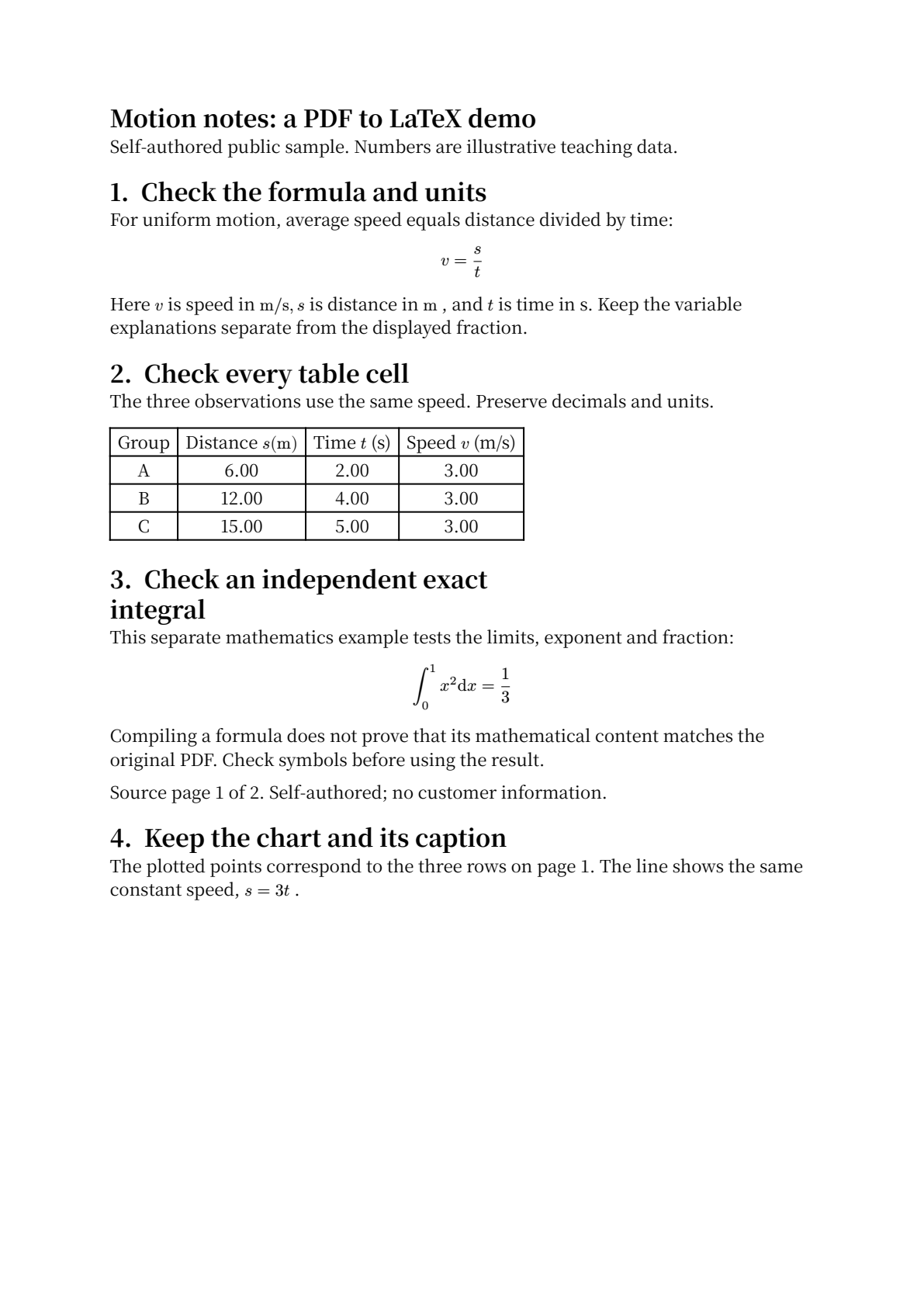
Page 1 of the previously compiled PDF; this run's successful outputs match the complete file. Both original and output have two pages, but section 4 and its figure are separated. The previously missing chart-top label is still absent. Compare equations, cells, captions and full-page layout with the original PDF after compilation.
Common questions
Why does the image remain missing after adding --root?
--root sets the accessible project scope and the base for /.... It does not change the source-relative meaning of images/.... Compare the diagnostic's searched path with the directory structure first.
Does a project-root error mean the native ZIP omitted an image?
Not in this example. The native ZIP contains the required image. These errors come from locally reorganized copies. Keep the complete native project and compare path changes in your working copy.
Does this test the Typst web app, packages or every operating system?
No. These are local macOS arm64 compilations of this English project, which has no import, include or third-party packages. Cloud editors, Windows paths, package dependencies, other fonts and compiler versions require their own checks.