
Doc2X Desktop: Installation and Main Workflows
The desktop app combines document parsing, translation and local file management. This guide covers installation and the entry points for batch jobs, local archives and integrations. Parsing and translation still require a network connection and the applicable account quota; saving locally does not make processing offline.
1. Download and install
- Open the desktop and plugin download page, or choose 电脑版&插件下载 (Desktop & plugin downloads) from the avatar menu in the web app.
- Select the package for Windows 10/11, 64-bit, or macOS on Apple M-series chips. The current page has no Linux or Intel Mac desktop card.
- Click the download button. macOS first opens an installation guide; continue from that guide to download. If the package list fails to load, use 重试 (Retry).
- Follow the installer and operating-system prompts, then launch Doc2X. Downloading a package does not itself start the app.
- Click 登录 (Sign in). To continue working with web documents, use the same Doc2X account and locate them in 30天临时存储 (30-day temporary storage).
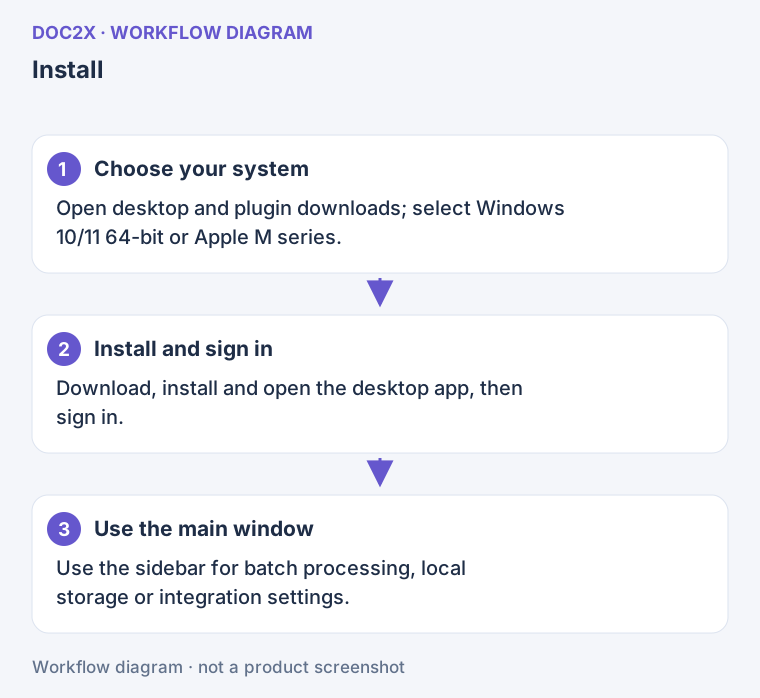
Diagram: Install and sign in to the desktop app, then use its main window for batch processing, local storage and integrations.
The download page also distributes Zotero and browser plugins. Install those in their respective applications; they do not replace the Doc2X desktop app. Follow the current page instructions for mobile or other beta cards.
Actual download check
On 2026-10-10, the official center delivered the Windows 1.7.7 EXE and Apple M macOS 1.7.5 DMG. The Windows button starts the download directly; the macOS button first opens a guide, where 下载 MacOS 客户端 starts the actual download.
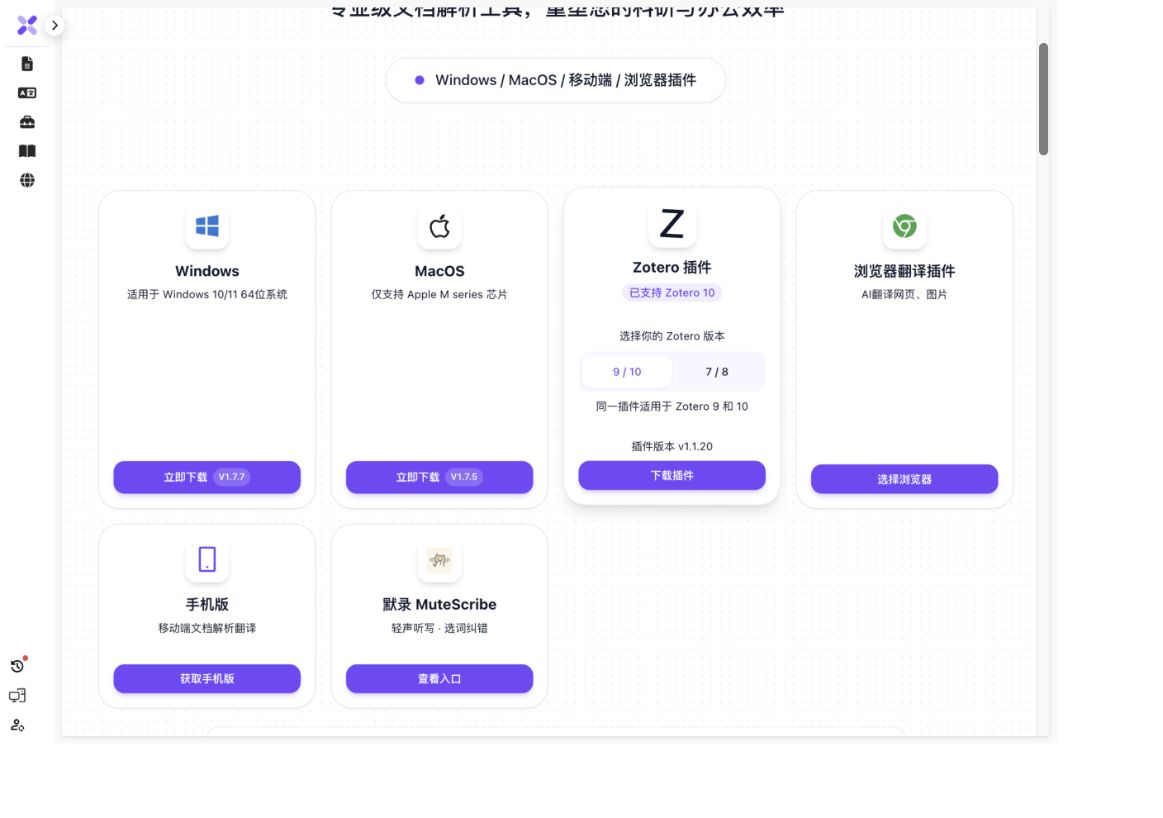
The check covered file size, type signatures and SHA-256, and the macOS disk image passed checksum verification. Neither client was installed or run. Screenshot versions are dated observations; use the live page for updates. The desktop download guide provides the file inspection record.
2. Check three things on first use
- Account: open the avatar menu → 账户管理 (Account management) and check the account and membership. Retry a failed quota load rather than assuming the balance is zero.
- Workflow: use document parsing or translation for one file; select 批量处理 (Batch processing) in the desktop main window for multiple files.
- Save location: ordinary downloads, permanent archives and batch outputs have separate settings. Use the table below and start with a short document to confirm the workflow.
| Goal | Entry | Where the result appears |
|---|---|---|
| Process one PDF or image | Document parsing or image upload | Cloud temporary records and files you explicitly download |
| Translate one document | Document translation | The result page and cloud temporary records |
| Process multiple files | 批量处理 → 仅解析 / 解析+翻译 | The project's local output directory |
| Keep existing cloud results locally | Project menu → 导入到本地 (Import locally) | The archive folder and local records configured in Local Storage Settings |
| Set an ordinary default download folder | Avatar → Account management → 个人设置 (Personal settings) | Used only by exports that select the default save location |
| Send results to another service | Account management → 转存设置 (Online Save Settings), then the relevant result or project menu | The selected external service |
3. Useful desktop settings
Open the avatar menu → Account management, then choose:
- 个人设置 (Personal settings): default download directory, file naming and navigation after task completion. Windows also has window-close behavior settings.
- 本地存储设置 (Local Storage Settings): permanent archive directory, formats, automatic local import and migration.
- 截图快捷键设置 (Screenshot Shortcut Settings): configure the system screenshot shortcut; on macOS follow the permission instructions. Sending a screenshot for recognition still starts a document-processing task.
- 划词设置 (Text selection settings): desktop selection behavior, shortcuts and processing preferences. See text selection translation.
- 墨墨背单词 (Maimemo): connect an account and choose a wordbook. See Maimemo connection and word collection.
- 转存设置 (Online Save Settings): connect Notion, FlowUs or NotebookLM, or configure WebDAV.
These desktop settings may be absent in an ordinary browser. If Batch processing is missing, check that you are signed in to the desktop main window rather than a browser or an auxiliary window.
4. Versions and updates
The client main window checks for updates on startup and displays checking, preparation or ready states. Normal web pages and independent auxiliary windows do not own the same update flow.
- Open the main window and inspect the update notice. While checking or preparing, keep the network available and wait for a state change. Preparation does not mean installation has finished.
- When Update ready (更新就绪) or Installer ready (安装包就绪) appears, save edits and inspect running tasks, then click the offered update action.
- If manual installation is required, open the prepared installer and follow the system installation flow. After reopening the app, check the version entry and normal feature access before considering the update complete.
- For network or timeout errors, restore connectivity and use Retry (重试) in the notice. Apply failures also retain a retry entry. If the shell is old or update capabilities are unavailable, use the offered official download entry for your system.
The renderer receives update states from the desktop main process, which performs actual download, verification, installation or runtime switching. This tutorial does not guarantee those operations succeed. For repeated failure, record the message and versions and use Contact us. Before reinstalling, confirm edits are saved and locate local files.
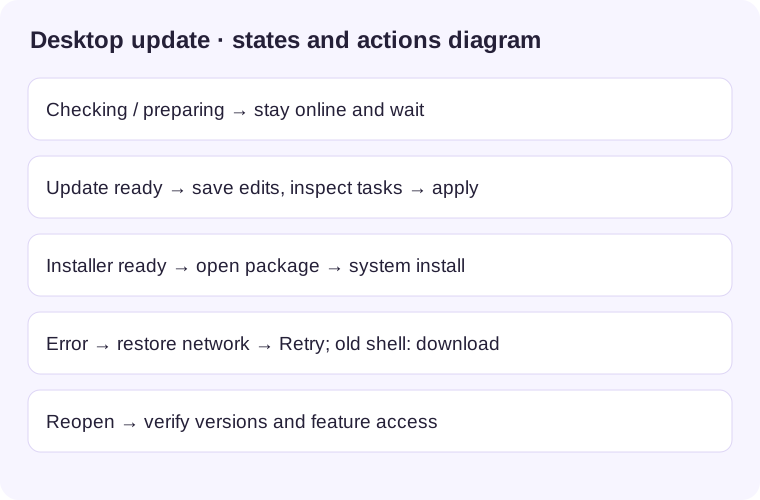
Workflow illustration, not a product screenshot. Click to enlarge in a new tab.
Continue by task
| Task | Guide |
|---|---|
| Batch upload, parse, translate and save | Batch processing |
| Archive cloud results, migrate folders or save Markdown | Permanent local storage and local files |
| Choose a transfer destination and entry | Transfer overview |
| Transfer multiple existing results | Batch transfer |
| Process Zotero papers or send existing results to Zotero | Zotero plugin and exports |
| Sign in and check membership or usage | Account and membership |
Common situations
- Web records are missing in desktop: check the account and whether you selected cloud temporary storage or permanent local storage. Local archives belong to the relevant computer and save location.
- A downloaded file is missing: distinguish the installer, ordinary download folder, batch output directory and permanent archive directory. Use the relevant task's Open or folder action.
- Does closing the window stop work? Closing, minimizing and quitting depend on desktop settings. Pausing a batch does not cancel a remote task already submitted; inspect the task status.
- An integration stops working after an account switch: connection settings are account-bound. Check the original account, then reconnect as needed to avoid choosing the wrong destination.
A browser page says “Connecting to client”
The client may automatically open a connection page in your browser. Wait while it says 正在连接客户端. 已连接客户端 means the browser's anonymous client-download record was linked; a later client sign-in associates it with the current account. The page attempts to close automatically. If it remains open, use 关闭此页 or close the tab and return to the client.
可以返回客户端了 also lets you continue normally. A signed-in browser, missing/expired ticket or absent anonymous download record can prevent linking; failure does not affect client use. This flow associates anonymous download records, without signing in or synchronizing files. You do not need to enter link parameters. Sign in to the same account separately to view your documents.
Windows, tray and zoom controls
- On Windows, the custom title bar provides minimize, maximize/restore and close. If closing shows a prompt, choose minimize, tray or exit as needed; the prompt can remember your choice.
- To restore the prompt, open avatar → Account management → Personal settings → When clicking Close (Windows only) and choose Ask every time (每次询问). Close the window again to verify the prompt returns.
- Use the tray's parsing or translation entries to switch features, then inspect task status in the reopened feature. Window visibility does not prove a task has stopped.
- On the parsing/translation home page, open the desktop version entry to view shell and application versions, adjust zoom or restore 100%. Verify text size changes. Stop when a button is disabled; UI thresholds do not guarantee a system-wide zoom range. Save edits before refreshing.
The desktop shell supplies these controls; normal browsers do not expose them. An independent auxiliary window may lack the main window's menus and updater. Return to the client main window if an entry is absent. If startup reports an unsupported version, obtain a current package from the download page; a recognized shell version below 1.7.0 triggers an upgrade prompt. The Windows close policy described here does not describe macOS window behavior.
Configure preferences and verify persistence
- Sign in, then open avatar → Account management → Personal settings. Mobile navigation's Preferences opens the same configuration page.
- Adjust automatic task-detail navigation, enhanced context translation, suppression of the daily check-in popup and network-environment alerts. Web also provides browser-extension conflict alerts. Enabling 每日不再自动弹出签到 suppresses automatic check-in prompts.
- Check upload/export filename separators (
-,_orcamelCase), PDF bookmark retention and image recognition models. The default Doc2X model cannot be deselected. Member models and other vision models depend on the account and current model catalogue. - On desktop, enter Default download location (文件默认下载位置) or click Select directory (选择目录) and confirm in the system picker. Cancelling leaves the directory unchanged. This affects exports that use the default location, rather than replacing batch-project or permanent-archive directories.
- Ordinary preference changes persist automatically in the current environment. Leave and reopen settings to verify switches, options and directory. Web uses browser storage; desktop uses client storage, without a cross-device synchronization guarantee. Check behavior the next time you use the feature. For an existing export, open its saved directory to verify the actual location.
If choices are lost, check that you are using the same browser/client and that persistence is allowed, then change and reopen settings again. If the directory picker does nothing, return to the main client window and check its version. A manually entered path still needs to exist and be writable; its appearance in the field does not prove a file was saved.
Parse a system screenshot
For recorder save/cancel details, see Account settings: screenshot shortcuts.
- In the client, open avatar → Account management → Screenshot shortcut settings (截图快捷键设置). Click Start recording (开始录制), press the desired combination and choose Save (保存). Cancel or press Esc to discard this recording.
- Check the displayed combination. Saving a nonempty combination requests shortcut registration from the desktop capture bridge; a saved label does not prove system registration succeeded. On macOS, follow any actual screen-recording permission prompt, then try again.
- With the client main window available, press the saved shortcut and select a region using the system capture tool. When image bytes reach the capture callback, the main layout sends a PNG to the ordinary upload entry. Check the image, select parsing and submit as the page requires.
- When processing finishes, check text, formulas or tables on the image result page, then copy or export. Recognition requires network and account conditions; it is not offline OCR.
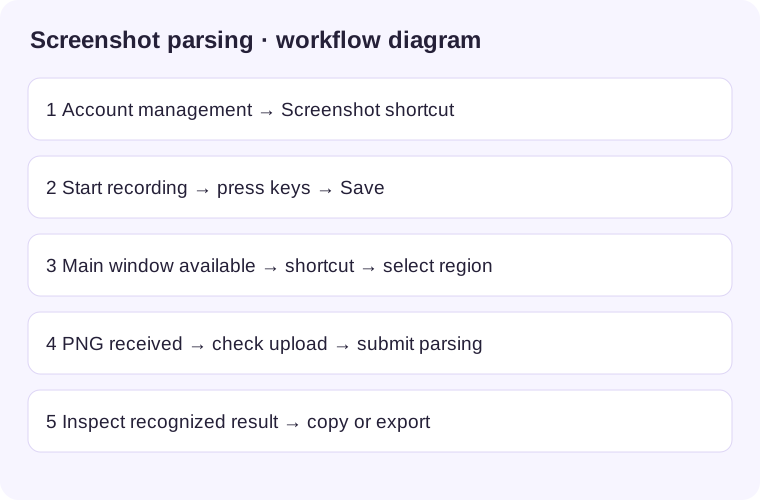
Workflow illustration, not a product screenshot. Click to enlarge in a new tab.
If the shortcut does nothing, save a different combination without a conflict and check the client version and system permissions. The settings page does not guarantee permission was granted. If no uploaded image appears, save an image with your system tool and upload it through the ordinary image entry. These steps describe verified frontend behavior; the desktop main process implements capture, permission checks and system shortcuts, so success in every system environment is not guaranteed.