
Doc2X MCP guide
For personal workspace Token delivery and remote OAuth authorization, see Main product account MCP authorization.
Doc2X MCP wraps Open Platform PDF/image parsing, status queries, and local file storage. A client starts a local stdio process. File paths must be readable on that process's machine; mentioning a filename in chat does not upload it.
This guide is checked against public npm package @noedgeai-org/doc2x-mcp@0.1.5. Both languages pin the same version. Review the official release/tool documentation before upgrading; older versions may lack newer tools.
Prerequisites
- Node.js 18+ and
npx; also satisfy the installed dependencies' actual requirements. - An API Key and parsing quota from the Open Platform.
YOUR_DOC2X_API_KEYis a placeholder, not a desktop login token. - A readable absolute input path and a writable new output directory. Follow the API limits, not website/CLI format assumptions.
- A client able to launch stdio processes and access the network. Configure a proxy only when your network requires one.
Common configuration
{
  "command": "npx",
  "args": ["-y", "@noedgeai-org/doc2x-mcp@0.1.5"],
  "env": {"DOC2X_API_KEY": "YOUR_DOC2X_API_KEY"}
}
Use your client's MCP configuration, not a chat message, for the real key. Configuration files may store environment values in plaintext, so check permissions and sharing. Confirm the server/tool list before authorizing a task. A connected server has not necessarily parsed a document.
PDF to local files
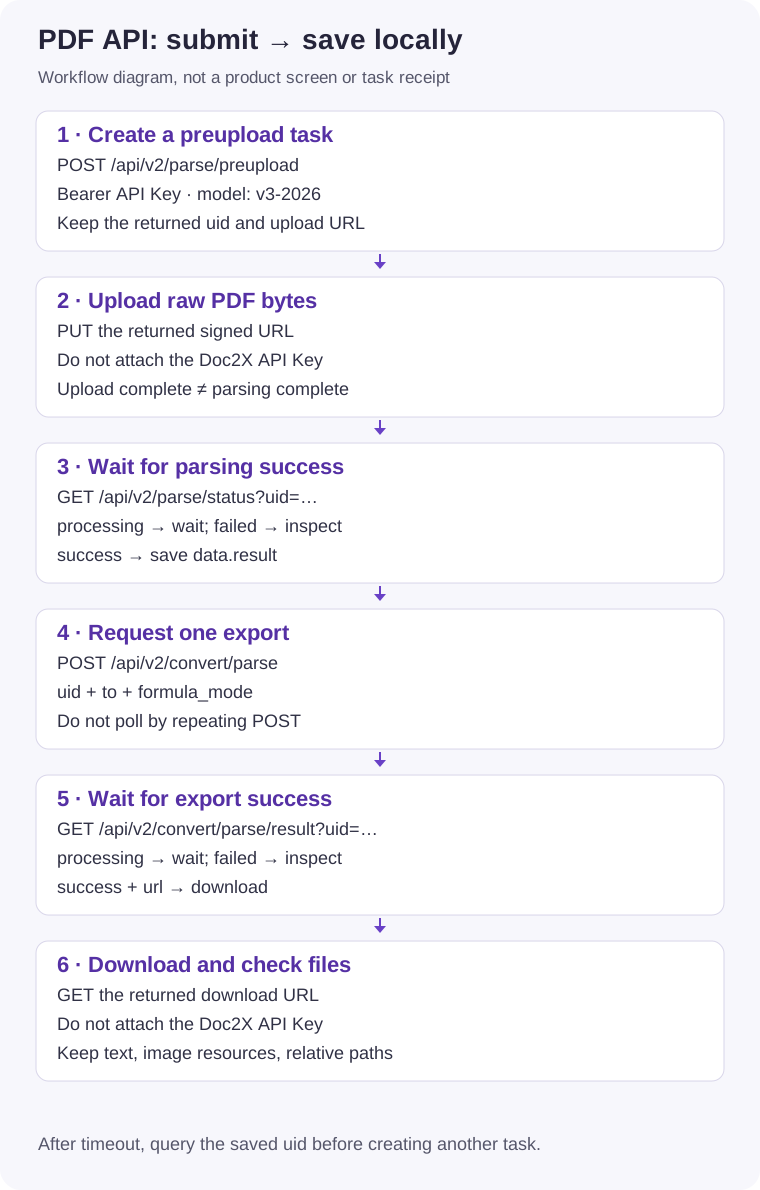
These are tool-argument examples, not terminal commands. Replace paths and use the returned uid in place of TASK_UID.
Call
doc2x_parse_pdf_submitand retain its task ID.json{"pdf_path":"/absolute/path/paper.pdf","model":"v3-2026"}Call
doc2x_parse_pdf_statuswith{"uid":"TASK_UID"}. Continue only afterstatus=success; wait forprocessing, inspectdetailforfailed. This tool returns a status summary, not the full document.Call
doc2x_convert_export_wait, selecting the format and formula mode explicitly. It can submit and await one export; do not repeatedly run submit in parallel.json{"uid":"TASK_UID","to":"md","formula_mode":"normal","filename":"paper"}Use the successful returned URL with
doc2x_download_url_to_file.json{"url":"https://download.example.invalid/export.zip","output_path":"/absolute/path/output/export.zip"}Check the actual path and format. MD/TEX may arrive as ZIP archives; preserve adjacent resources and relative paths. Open DOCX in an office application. A tool's success does not establish correct editing, layout, or content.
Suggested prompt:
Use doc2x-mcp to parse /absolute/path/paper.pdf with model v3-2026.
Keep the returned uid, wait for parsing success, export md with formula_mode=normal,
and download to /absolute/path/output/. Report actual saved paths.
On timeout, report the existing uid and stage instead of submitting again.
Summaries, translations, and outlines are normally subsequent work by the client's model reading the result. They are not a separate document-translation API exposed by this MCP; model services may charge separately.
Tools and stages
| Tool | Input/result |
|---|---|
doc2x_parse_pdf_submit | pdf_path, optional model; create a task and return uid. |
doc2x_parse_pdf_status | uid; status, progress, and failure detail. |
doc2x_parse_pdf_wait_text | Prefer existing uid; wait for merged text with page/character limits. Supplying only pdf_path can create a new task. |
doc2x_materialize_pdf_layout_json | output_path plus uid or pdf_path; save raw result JSON. Layout requires v3-2026, the default when submitting from a path through this tool. |
doc2x_convert_export_submit | uid, to, formula_mode; create an export, not a polling call. |
doc2x_convert_export_result | uid; latest export state/URL. |
doc2x_convert_export_wait | uid, to, formula_mode; await export with bounded-wait options. |
doc2x_download_url_to_file | url, output_path; download from an allowed host. |
doc2x_materialize_convert_zip | convert_zip_base64, output_dir; save/attempt extraction. Without a system extractor it may save only the ZIP. |
doc2x_parse_image_layout_sync | image_path; raw synchronous result JSON, possibly including convert_zip. |
doc2x_parse_image_layout_submit | image_path; create an async image task and return uid. |
doc2x_parse_image_layout_status | uid; image task state/completed result. |
doc2x_parse_image_layout_wait_text | Prefer existing uid; wait and return first-page Markdown. |
doc2x_debug_config | Empty {}; configuration diagnostics can include key prefix/length, so redact before sharing. |
Structured JSON and images
To save v3 JSON, call doc2x_materialize_pdf_layout_json with {"uid":"TASK_UID","output_path":"/absolute/path/output/layout.json"}. Export options cannot turn a non-v3 task into a full layout result. Check the actual source model/fields before deciding to create another task. See v3 result structure.
Images use image_path: choose synchronous or async submission. For async work, retain uid and poll. If the completed result includes convert_zip, materialize it locally. Text returned to chat is not a complete resource bundle. See image API.
Environment variables
| Variable | Default/purpose |
|---|---|
DOC2X_API_KEY | Required Open Platform key. |
DOC2X_BASE_URL | https://v2.doc2x.noedgeai.com |
DOC2X_HTTP_TIMEOUT_MS | 60000, per HTTP request. |
DOC2X_POLL_INTERVAL_MS | 2000, polling interval. |
DOC2X_MAX_WAIT_MS | 600000, wait-tool deadline; timeout does not cancel the task. |
DOC2X_PARSE_PDF_MAX_OUTPUT_CHARS | 5000, returned PDF text limit; 0 disables it. |
DOC2X_PARSE_PDF_MAX_OUTPUT_PAGES | 10, merged PDF page limit; 0 disables it. |
DOC2X_DOWNLOAD_URL_ALLOWLIST | .amazonaws.com.cn,.aliyuncs.com,.noedgeai.com; do not default to * after a download failure. |
Formula and file boundaries
- Export
toismd/tex/docx; website XLSX, preserved-layout Word, and MathType menus do not imply MCP arguments. formula_modeis required (normal/dollar).formula_level=0/1/2applies only to v3 source tasks. Download each comparison result immediately before requesting another export for the same task.- PDF wait-text defaults to at most 10 pages and 5000 characters. Export files for the full content; do not describe a truncated response as a complete document. API results last approximately 24 hours: save promptly.
- Another client, process restart, or expired cache can make a path-only call submit again. Prefer a retained uid to continue.
Client setup
Optional workflow Skill
The MCP server supplies tools; a Skill supplies instructions. They are separate installations. Follow the official Skill and installation instructions, reviewing scripts and target directories first. Installing a Skill alone does not authenticate the API or authorize a business task.
Troubleshooting
| Symptom | Action |
|---|---|
Missing npx/offline server | Check Node, PATH, process environment, and dependency access. A stdio process waiting for input is not necessarily stuck. |
| Invalid Key | Inject the Open Platform key into the server process; never post the full key or unredacted diagnostic output publicly. |
| Missing input/unwritable output | Paths belong to the MCP host, which may differ from the browser machine. Check absolute paths and permissions. |
| Timeout after submission | Retain uid and query status, instead of submitting again. |
| Quota/concurrency failure | Wait for existing work and check platform quota; increasing local timeouts does not bypass service limits. |
| Unreadable output | Check actual format, ZIP contents, resource paths, and UTF-8. Do not just rename extensions. |
| Rejected download host | Confirm the URL came from the task and uses official hosting; investigate expiry/configuration before changing the allowlist. |